

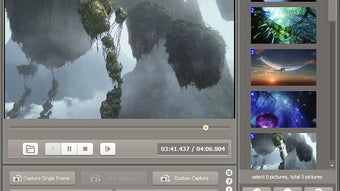

Description
Download Video Snapshot Wizard – Free Frame Capture Tool for Windows & Mac
Video Snapshot Wizard is a powerful and user-friendly software designed for capturing individual frames from video files with precision and speed. Whether you're a content creator, educator, or casual user, this tool simplifies the process of extracting high-quality images from your favorite videos. With support for over a dozen video formats—including AVI, FLV, ASF, MOV, RM, RMVB, WMV, MKV, VOB, MPG, and MPEG—Video Snapshot Wizard ensures broad compatibility across media files. Its intuitive interface and advanced features like continuous frame capture, GIF creation, and image editing make it a must-have for anyone working with video content. You can easily extract stills, generate thumbnails, or even compile animated GIFs from your favorite scenes. The software is free to download and use, with regular updates to improve performance and fix bugs. Perfect for educators creating visual aids, YouTubers extracting promotional images, or anyone who needs to pull key moments from videos, Video Snapshot Wizard delivers reliable, secure, and efficient results.
Key Features of Video Snapshot Wizard
Video Snapshot Wizard stands out in the crowded field of video tools thanks to its comprehensive and practical feature set. One of its most powerful capabilities is continuous frame capture, allowing users to extract multiple images in rapid succession without missing a single frame. This is especially useful when capturing action sequences or detailed animations from videos. The software supports over 12 common video formats, including AVI, WMV, MKV, MOV, and MPG, ensuring that no matter what type of video you're working with, you can extract frames seamlessly.
Another standout feature is the ability to create animated GIFs directly from captured frames. This is a game-changer for social media creators and marketers who need quick, engaging visual content. Instead of exporting frames and using external tools, Video Snapshot Wizard handles the entire process in one place. The tool also supports editing of BMP, JPG, and GIF images right after capture, enabling users to crop, resize, or apply filters before saving. This built-in editing function saves time and eliminates the need for additional software.
Additionally, the software allows for thumbnail generation, making it ideal for video libraries, online courses, or content management systems. Users can automatically generate small preview images for each video segment, improving organization and accessibility. The interface is clean and intuitive, making it easy for beginners to use while still offering advanced options for power users. All features are optimized for speed and stability, ensuring smooth performance even with large video files. With regular updates and a secure download process, Video Snapshot Wizard remains a reliable choice for frame extraction.
How to Install and Use Video Snapshot Wizard
Getting started with Video Snapshot Wizard is quick and straightforward. First, visit the official download page and click the free download button. The installation file is lightweight and typically under 10MB, ensuring fast downloads even on slower connections. Once downloaded, run the installer and follow the on-screen prompts—no complicated setup steps are required. The software is compatible with Windows 7 and later versions, including Windows 10 and Windows 11, and also supports Mac OS X for Apple users. After installation, launch the app and you’ll be greeted with a clean, minimal interface.
To begin capturing frames, click the “Open Video” button and select your desired file from your computer. The video will load into the preview window, and you can use the playback controls to navigate to the exact frame you want. For continuous capture, simply click the “Capture” button and set your desired interval (e.g., every 1 second). The software will automatically extract frames at that rate and save them to your chosen folder. You can also manually capture single frames by pressing the spacebar or clicking the capture icon.
Once frames are captured, you can access them through the “Image Preview” panel. Here, you can view, edit, or export images in BMP, JPG, or GIF formats. To create a GIF, select multiple frames, go to the “GIF Creator” tab, and adjust settings like speed and loop count. The tool automatically optimizes the file size while maintaining quality. For thumbnails, use the “Thumbnail Generator” tool to batch-process multiple videos and generate preview images. All steps are intuitive, making Video Snapshot Wizard accessible to users of all skill levels.
Compatibility and System Requirements
Video Snapshot Wizard is designed to run smoothly on a wide range of devices, ensuring broad accessibility. The software is officially supported on Windows 7, 8, 10, and 11, making it ideal for both older and modern PCs. For Mac users, the application is compatible with macOS 10.12 (Sierra) and later versions, including the latest Apple Silicon and Intel-based Macs. This cross-platform availability means users can use the tool regardless of their operating system preference.
System requirements are modest, which is great news for users with older hardware. The software requires a minimum of 1 GB of RAM, a 1 GHz processor, and at least 50 MB of free disk space for installation. For optimal performance, especially when working with large video files or creating GIFs, a recommendation of 2 GB RAM and a dedicated graphics card is advised. The app supports high-resolution video playback and frame extraction without lag, thanks to efficient memory management and hardware acceleration.
Video Snapshot Wizard also supports a wide range of video codecs, meaning you don’t need to install additional media players or codecs to use it. Whether you're working with compressed AVI files, high-definition MKVs, or legacy WMV clips, the software handles them with ease. It’s also compatible with external drives and network folders, allowing you to capture frames from videos stored on USB drives or shared folders. The app runs in the background without consuming excessive system resources, making it ideal for multitasking. With regular updates and a secure download process, users can trust that their system remains protected while using this powerful tool.
Pros and Cons of Video Snapshot Wizard
- Pros:
- Supports over 12 video formats including AVI, WMV, MKV, MOV, and MPG
- Continuous frame capture with customizable intervals
- Direct GIF creation from captured frames
- Built-in image editing for BMP, JPG, and GIF
- Batch thumbnail generation for video libraries
- Free to download and use with no hidden costs
- Lightweight and fast performance on older systems
- Intuitive interface suitable for beginners and pros
- Cons:
- No mobile version for Android or iOS (only desktop)
- Advanced features require some learning curve
- Limited customization options for GIF output
- No built-in video trimming or editing tools
- Occasional lag with very large video files
Frequently Asked Questions (FAQ)
Is Video Snapshot Wizard free to download?
Yes, Video Snapshot Wizard is completely free to download and use. There are no trial periods or subscription fees. You can access all core features—frame capture, GIF creation, and image editing—without any cost.
Can I use Video Snapshot Wizard on Mac?
Yes, Video Snapshot Wizard supports macOS 10.12 and later versions. The software is available for Apple Silicon and Intel-based Macs, ensuring compatibility across modern Apple devices.
Does it support 4K video files?
Yes, Video Snapshot Wizard can handle 4K video files, though performance may vary depending on your system’s hardware. For best results, ensure your computer has at least 2 GB of RAM and a capable processor.
Can I edit captured images directly in the app?
Yes, the software includes basic image editing tools for BMP, JPG, and GIF files. You can crop, resize, and apply filters directly within the app before saving or exporting.
Is the software secure to download?
Yes, Video Snapshot Wizard is distributed through secure channels with virus scanning. The download is verified to be safe and free from malware or adware.
Final Verdict: Why You Should Download Video Snapshot Wizard
Video Snapshot Wizard is a reliable, efficient, and free tool that makes frame extraction from videos simple and intuitive. Whether you're a content creator looking to generate thumbnails, a teacher preparing visual aids, or a casual user wanting to save memorable moments from videos, this software delivers excellent value. Its support for multiple formats, continuous capture, and built-in GIF creation sets it apart from basic screenshot tools.
While it lacks mobile support and advanced video editing features, its core functionality is rock-solid and well-optimized. The lightweight design ensures smooth performance even on older systems, and the regular updates keep it secure and bug-free. If you're searching for a secure, free, and powerful video frame capture tool, Video Snapshot Wizard is an ideal choice.
Download Video Snapshot Wizard today and take full control of your video content. Perfect for Windows and Mac users, this software helps you extract, edit, and share video frames with ease. Start creating high-quality visuals in minutes—no experience required.
Guides & Tutorials for Video Snapshot Wizard
How to install Video Snapshot Wizard
- Click the Preview / Download button above.
- Once redirected, accept the terms and click Install.
- Wait for the Video Snapshot Wizard download to finish on your device.
How to use Video Snapshot Wizard
This software is primarily used for its core features described above. Open the app after installation to explore its capabilities.
User Reviews for Video Snapshot Wizard 0
No reviews found





